|
 JpegSizer
is compatible with all versions of Windows, from 98SE to Vista and
Windows 7.
JpegSizer
is compatible with all versions of Windows, from 98SE to Vista and
Windows 7.
|
|
You can
choose between the Home, Pro and Plus versions. The free trial version
lets you try all three, to decide which one is best for you.
|
|
JpegSizer is not limited to JPEG files. You'll find a version that
handles the file formats you work with.
|
|
JpegSizer
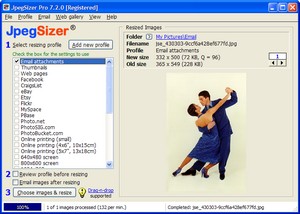
stores profiles for different projects, so you don't have to
remember all the details of what you did last time. Pre-defined
profiles are included for many common projects.
|
|
You
have many different ways to select images for resizing, using
JpegSizer itself, Windows Explorer, a thumbnail viewer or graphics editor.
|
|
JPEG
compression can be automatically adjusted to yield the file size
you need. No more trial-and-error to get the right size!
|
|
Image
quality is excellent, thanks to the choice of advanced resizing and
sharpening methods.
|
|

 During resizing you can add borders, captions and watermarks to
images During resizing you can add borders, captions and watermarks to
images
|
|
After
resizing you can check the results on screen, and use the
built-in emailer
and web gallery
builder.
|
|
For automated resizing, you can use a watch folder.
Or JpegSizer can be controlled from other applications via command
line switches. A DLL
is also available for programmers.
|
|
The Quick
Start Guide has you resizing images in about a minute. The
Help system has step-by-step procedures and tips on many topics.
|
|
Technical
support is FREE.
|
|
Minor software
updates are FREE.
The Pro and Plus versions include free lifetime major updates.
|
|
Start
resizing photos now!
Back
to top
|