Bookmark and Share

Version 6.4

Works with Vista

Rated by download.com

Edición en Español

también está disponible


FREE!

15-day trial

Software updates

Technical support

Why Image Resizing is Important

Advantages of Using JpegSizer

Screenshots

Testimonials

For Developers & Webmasters

Change History

Support and Feedback

Main Page


Developed and published by
TM

Seattle, Washington, USA

Home page  Contact us  Privacy policy

© Copyright 2008 by TangoTools.com


Features & Benefits

Note: marks features only available in the Pro version of JpegSizer.

 Important Things to Know About JpegSizer

JpegSizer is compatible with all versions of Windows, from 98SE to Vista.

You can choose between the Home version (for ease of use) or the Pro version (for its advanced feature set). The free trial version lets you try both, to decide which is best for you.

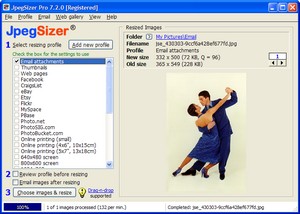
JpegSizer stores settings for different projects, so you don't have to remember all the details of what you did last time. Pre-defined settings are included for many common projects.

 You have many different ways to choose images for resizing, using JpegSizer itself, Windows, a thumbnail viewer or graphics editor. 

JPEG compression can be automatically adjusted to yield the file size you need. No more trial-and-error to get the right size!

 Image quality is excellent, thanks to the choice of resizing and sharpening methods.

During resizing you can add borders, captions and watermarks to images

 After resizing you can check the results on screen, and use the built-in emailer and web gallery builder.

For automated resizing, JpegSizer can be controlled from other applications. Or you can use the "watch folder". A DLL is also available for programmers.

The Quick Start Guide has you resizing images in about a minute. The Help system has step-by-step procedures and tips on many topics.

Technical support and software updates are FREE.

Download JpegSizer and try it FREE for 15 days!

Now for the details...

 Batches of Any Size

 Resize single images or batches of any size

 Resize entire folders of image files

 Use drag-and-drop or copy-and-paste to resize files or folders selected from Windows, a thumbnail viewer or a graphics editor

 Resize files or folders from the Windows Send To context menu

 Repeat the last batch or select from recent images

  Resize images using multiple settings in the same run (e.g. full-size and thumbnail images for a web site)

  Option to include files in subfolders when resizing all files in a folder

 Settings Remember Resizing Parameters

 Stores settings for different projects

 Includes default settings for many common projects

 Edit existing settings or add new ones

 Make temporary changes to settings for each batch

 Resizing Rules

Reduce or enlarge images to any desired size

 Resize by width, height or both

 Resize by longest side so vertical and horizontal images have the same size

  Fill both width and height dimensions by stretching images

 File Formats & Image Compression

 Resize original images in these formats: JPEG, TIFF, JPEG-2000, GIF, PNG, BMP and PCX

 Save resized images in these formats: JPEG, GIF, TIFF (with or without LZW compression, and RGB or CMYK color depth), and PNG.

  Automatically calculates JPEG quality (compression) needed to achieve desired file size -- no more trial-and-error!

 Borders, Captions and Watermarks

  Add borders to resized images in any color and width

  Add captions or watermarks to resized images in any text font and color, with optional text smoothing

 High Image Quality

 Control the sharpening of resized images

 Advanced Lanczos3 resampling algorithm

  Choice of 12 different resampling algorithms for resizing

 Flexible File Naming

 Keep original filenames, add a prefix or suffix, or rename files with  auto-numbering

 Convert filenames to all lower or upper case

 Replace spaces in filenames with underscores

  Use variables in filenames (e.g. file dates)

  Timestamp resized files to match original files

 Options After Resizing

 On-screen preview of resized images, with zoom and pan

 Old and new dimensions and file sizes displayed for checking

 Built-in emailer to send images using your email client program

  Built-in web gallery designer, builder and uploader

 EXIF, IPTC and DPI

 Option to auto-rotate images by applying the EXIF orientation tag

  Option to copy EXIF and/or IPTC data from original to resized files

  Set the DPI of resized images to any value

 Automation

  Monitor a watch folder for automatic processing of deposited files

  Control JpegSizer from other applications, using command line switches

 Use the JpegSizer DLL (available separately) to embed JpegSizer's resizing technology in your own applications

 Networks & Large Files

 Full support for files on local networks

 Resize the huge image files that cause other programs to crash

 Help and Support

 Built-in Quick Start Guide for immediate results

 Extensive Help system included

 Printable PDF manual included

 Free technical support via the Internet

  Priority technical support

Start resizing photos now!

Back to top