Due
to circumstances beyond our control, TangoTools.com is no longer in
business. Licenses for our software are no longer available.
We
continue to provide free technical support to licensed users of
JpegSizer.
You are
responsible for a web site, and need to resize images before sending
them to a browser
One
approach is to use real-time server-side image resizing, using a
utility such as AspJpeg. When a thumbnail or full-size image is needed,
the original image is resized and transmitted, but not saved.
The
Pre-Sizing Advantage
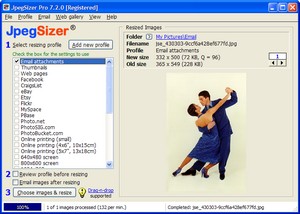
JpegSizer offers an
efficient "pre-sizing"
alternative:
You resize images once,
instead of on every hit
You have many more options available
during resizing
The image processing burden on your server is eliminated
Your server no longer has to store large original hi-res image files
If
you are currently delivering high-resolution original images -- without any
resizing -- resizing will make your images download to users at least 10 times faster, and your site's bandwidth
requirements can be reduced by at least 90%. What's more, you protect your
valuable hi-res images from unauthorized use and copying.
Original
hi-res image files are typically reduced from 2MB to 50KB -- a 40-fold reduction.
This will only get better over time as cameras output more pixels.
Generating
Thumbnails
You can do this in
real-time with AspJpeg. By resizing the "full-size" images
instead of the originals, the computing load has again been reduced
at least 90%. This benefit is magnified by the number of thumbnails on a
web page.
Pre-sizing
thumbnails with JpegSizer has an advantage if your full-size
images contain a caption or watermark that would not display well in a
thumbnail. In this case you would add the text when you create the
full-size images, and omit it when you create the thumbnails.
Thumbnail
files are typically only 4KB each, so the additional storage requirements
are minimal.
With
JpegSizer Pro, you can even create both full-size and thumbnail images in a single run.
Automation
You can use JpegSizer manually, or you can control
the Plus version from your own
Windows applications (see technical details).
An
example of the latter would be a database application where your staff are
adding records with images, and the images must be resized prior to storage. A
few lines of code in the database program will make the resizing automatic
and transparent to the user..
All
of the above
techniques can be implemented with the standard end-user version of
JpegSizer. Customization is available, but is not normally needed.






 You resize images once,
instead of on every hit
You resize images once,
instead of on every hit
